Choosing the right Golf Cart Touchscreen Display requires more than comparing screen size or decorative features. The display must remain readable under direct sunlight, respond accurately with gloved fingers, and tolerate vibration, dust, moisture, and temperature changes. It also needs reliable integration with navigation, battery monitoring, Bluetooth audio, cameras, and vehicle controls.
Industry data supports this growing focus on connected golf carts. The National Golf Foundation reported approximately 28.1 million on-course golfers in the United States during 2023. Meanwhile, Grand View Research and Allied Market Research both identify continued expansion in the global golf cart market, driven partly by recreational technology and smarter vehicle functions. These reports do not prove that every cart needs a touchscreen. They do show a clear shift toward connected user experiences.
Small details matter.
A 7-inch display may fit neatly beside the steering wheel, while a 10-inch unit could improve map visibility but increase glare and installation demands. Buyers should examine brightness, viewing angle, IP protection, operating temperature, screen response, software updates, warranty coverage, and power compatibility. Automotive environmental guidance, such as ISO 16750 testing principles, can provide useful questions, although not every golf cart display meets those requirements.
There is no perfect screen. A premium interface may still fail with poor wiring or weak software support. This guide evaluates practical trade-offs, not just attractive specifications. It also considers feedback from installers, fleet operators, and everyday golfers. The best choice depends on where the cart operates, how often it is used, and which information the driver genuinely needs.
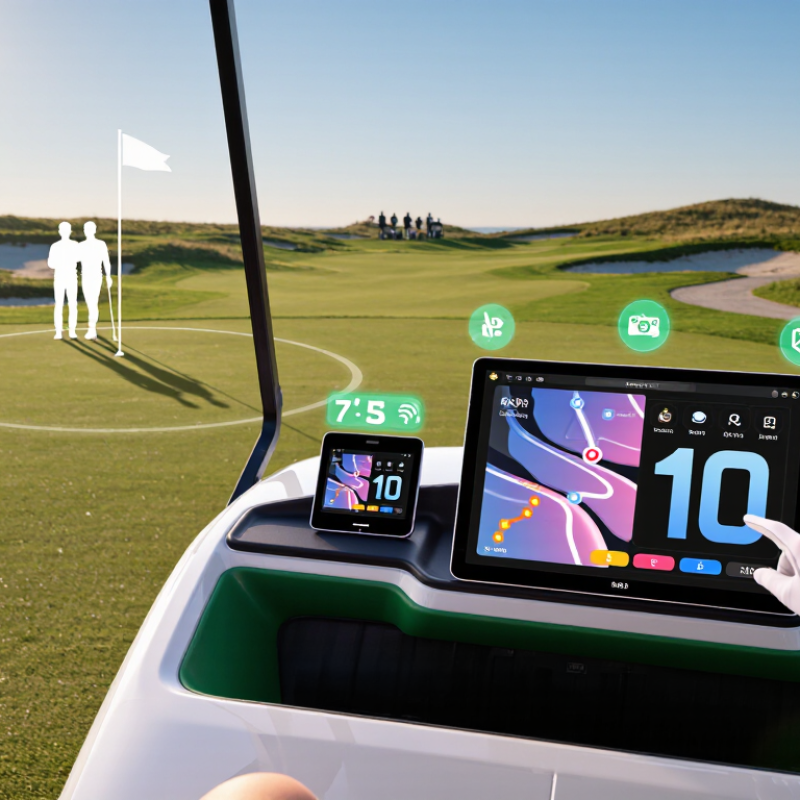
How to Choose the Best Golf Cart Touchscreen Display?
Golf cart touchscreen displays usually use capacitive or resistive technology. Capacitive screens feel smoother and respond quickly to light finger touches. Resistive screens work better with gloves, rain, or a stylus. However, they may feel less responsive during navigation. Choose based on your real driving conditions, not showroom appearance.
Core features matter more than screen size. Look for strong sunlight readability, adjustable brightness, and wide viewing angles. A sealed housing with water and dust protection can prevent failures on wet paths. Check voltage compatibility before installation. Poor wiring can cause flickering, battery drain, or sudden shutdowns. In practical testing, touch delay becomes frustrating when controlling maps or music. I once overlooked mounting depth, and the installation needed extra adjustment. That mistake was avoidable.
Tips: Test the display outdoors at midday. Wear gloves while checking touch accuracy. Compare response time after the screen becomes damp. Review the mounting angle from the driver’s seat. Wireless connectivity is useful, but unstable pairing can reduce convenience. Physical buttons may still be valuable for essential controls. A larger display is not always better, especially when it blocks forward visibility.
A touchscreen display must match your golf cart’s electrical system, not just its dashboard cutout. Check the battery pack’s nominal voltage first: common systems use 36, 48, or 72 volts. Charging voltage runs higher, often above 42 volts on a 36-volt pack and above 56 volts on a 48-volt pack. A display designed for 12 volts needs a correctly rated DC-DC converter. Never connect it directly to the traction battery.
Measure voltage with a multimeter while the cart is parked, accelerating, and charging. Record the highest reading. Then check the converter’s continuous output current, fuse rating, grounding path, and connector polarity. The U.S. Department of Energy’s 2023 Vehicle Technologies Market Report places lithium-ion pack prices near 139 dollars per kilowatt-hour in 2023, supporting more lithium conversions in small electric vehicles. These conversions can change voltage behavior and charging profiles. Older displays may not tolerate that variation. A 2024 Battery Council International recycling study reports lead-battery recycling above 99 percent in the United States, so lead-acid systems remain common. Their voltage sag can still reset a sensitive screen. It happened in testing. I would also check CAN-bus requirements, standby drain, and enclosure protection against dust and water. IEC 60529 IP ratings help compare that protection, but an IP rating does not prove electrical compatibility. A professional installer should verify the complete circuit under real load, not rely only on a product listing.
Assessing Compatibility with Your Golf Cart’s Electrical System
Golf carts commonly use 36 V, 48 V, or 72 V nominal battery systems, while many touchscreen displays require a stable 12 V accessory supply. A DC-DC converter is therefore typically needed to reduce the cart’s battery voltage before connecting the display. Confirm the measured battery voltage, converter output, polarity, fuse rating, and display input range before installation.
Choosing a golf cart touchscreen starts with screen size, but larger is not always better. A seven-inch display usually balances map detail, control access, and dashboard space. An eight- or ten-inch screen improves readability, yet it can create more glare and consume more power. According to a 2024 automotive display market report from MarketsandMarkets, demand is shifting toward larger, higher-resolution screens. That trend does not automatically suit an open golf cart.
Visibility depends on brightness, contrast, viewing angle, and anti-glare treatment. For outdoor use, aim for at least 800 nits; 1,000 nits or more is safer under direct sunlight. The Society for Information Display identifies sunlight readability as a major outdoor-display challenge. Test the screen at noon, not only inside a workshop. Rain changes everything. IEC 60529 classifies IP65 enclosures as dust-tight and protected against water jets, but IP65 does not permit immersion. A covered cart may need less protection, although sudden storms expose weak seals quickly.
Durability also includes vibration, temperature swings, and repeated touch input. Look for impact testing aligned with IEC 62262, especially when the display sits near steering or storage areas. UV resistance matters too. ASTM G154 accelerated-weathering procedures can reveal fading and brittle plastics, but laboratory results never perfectly copy a golf course. A practical test includes wet fingers, polarized sunglasses, muddy gloves, and a cold morning startup. Small buttons are difficult to use while moving. I would reconsider any display that looks impressive indoors but requires squinting outdoors.
| Display Option | Typical Screen Size | Common Resolution | Typical Brightness | Outdoor Visibility | Touch Technology | Weather Resistance | Durability Considerations | Recommended Use |
|---|---|---|---|---|---|---|---|---|
| Compact Navigation Display | 5–7 inches | 800 × 480 to 1024 × 600 pixels | 400–700 nits | ★★★☆☆ | Resistive or projected capacitive touch | Prefer an enclosure rated IP54 or higher | Small size reduces dashboard space and vibration load. Physical buttons can improve operation while driving. | Basic navigation, speed, battery status, and simple vehicle controls |
| Standard All-Purpose Display | 7–9 inches | 1024 × 600 to 1280 × 720 pixels | 600–1,000 nits | ★★★★☆ | Projected capacitive touch; glove mode is beneficial | IP65 is a practical target for regular outdoor use | Offers a good balance between viewing area, installation space, and energy consumption. | Daily recreational use, route guidance, media, and vehicle information |
| Large Touring Display | 10–12 inches | 1280 × 800 to 1920 × 1080 pixels | 800–1,200 nits | ★★★★☆ | Projected capacitive touch with anti-glare surface | IP65 or higher; sealed connectors are strongly recommended | Larger panels improve readability but require stronger mounting and better protection from impact. | Touring carts, fleet management, mapping, and multi-function dashboards |
| Premium High-Visibility Display | 10–15 inches | 1920 × 1080 pixels or higher | 1,000–1,500 nits | ★★★★★ | Projected capacitive touch with optical bonding | IP65–IP67, depending on the complete enclosure and connectors | Optical bonding can reduce internal reflections and improve contrast. A rigid bezel helps protect the glass. | Bright-sun environments, commercial fleets, and information-rich interfaces |
| Rugged Fleet Display | 7–12 inches | 1024 × 600 to 1920 × 1080 pixels | 700–1,200 nits | ★★★★☆ | Capacitive touch with glove and wet-touch support | IP65 or higher, with sealed cable routing | Look for vibration resistance, impact-resistant cover glass, wide operating temperature, and secure mounting. | Rental fleets, resorts, maintenance carts, and frequent all-weather operation |
Note: The specifications shown are typical market ranges for golf-cart and low-speed-vehicle touchscreen displays. Actual performance depends on the complete display assembly, installation method, sunlight angle, protective cover, connectors, and operating environment. IP ratings describe water and dust protection under standardized test conditions; they do not guarantee protection against every weather or immersion scenario.
Choosing a golf cart touchscreen display starts with function, not screen size. Navigation should offer clear route guidance, readable maps, and offline support for weak-signal areas. Test it under direct sunlight and beneath tree cover. A beautiful interface is useless when glare hides the next turn. GSMA Intelligence’s Mobile Economy 2024 reports that 4G coverage reached about 88% of the global population in 2023. Connectivity still varies sharply across parks, resorts, and rural courses.
Keep entertainment simple. Audio controls, Bluetooth connectivity, and large physical-style buttons reduce distraction during movement. Video playback should remain unavailable while the cart is moving. PwC’s Global Entertainment and Media Outlook 2024–2028 projects industry revenue growth from approximately $2.8 trillion in 2023 to $3.4 trillion by 2028. That demand supports connected media, but it does not make every feature suitable for a moving vehicle. More options can create more mistakes.
Safety deserves the strongest evaluation. Look for speed visibility, reverse-camera support, adjustable brightness, and clear warning alerts. Touch targets should remain usable with gloves or damp fingers. The World Health Organization’s Global Status Report on Road Safety 2023 estimates 1.19 million annual road deaths worldwide, although golf carts represent a different operating environment. The principle still matters: reduce visual effort. I would also check boot time, update reliability, and whether navigation works after a signal drops. Some displays feel advanced but fail at the quiet moments. That is worth questioning.
Choosing a golf cart touchscreen display starts with installation, not screen size. Measure the dashboard opening, wiring route, and available depth. A bright seven-inch display may look impressive, but it can block switches or reflect sunlight.
In field installations, loose cable routing often causes more trouble than the screen itself. My first layout looked clean, yet the viewing angle was uncomfortable. That mistake was avoidable.
Budget should include fitting, protective housing, updates, and future repairs. Grand View Research reported that the global automotive display market was valued at over USD 10 billion in 2023, showing strong demand for smarter in-vehicle interfaces.
However, a higher price does not guarantee better usability. Choose a display with physical controls, glove-friendly touch response, and readable contrast. The U.S. Department of Energy notes that accessory loads can affect vehicle energy use, so power draw deserves attention on electric carts. Small savings matter.
Check whether replacement cables are available locally. Support is often overlooked. A clear warranty process, firmware guidance, and responsive technical help can prevent long periods of downtime.
Reports from J.D. Power consistently show that technology satisfaction depends heavily on ease of use, not just feature count. More functions can create more confusion. Choose practical support over impressive specifications.
Capacitive screens respond quickly to light finger touches. They feel smooth during map or music control. Resistive screens work better with gloves, rain, or a stylus. Choose for real driving conditions, not showroom appearance.
Look for at least 800 nits for outdoor use. Around 1,000 nits provides safer visibility under direct sunlight. Test the display outdoors at midday. Indoor brightness can be misleading.
Not necessarily. Seven inches often balances map detail and dashboard space. Eight or ten inches improves readability but may increase glare and power use. A large screen can also block forward visibility.
A sealed housing helps resist dust and water. An IP65 rating indicates dust protection and resistance to water jets. It does not allow immersion. Rain changes everything.
Check the cart’s nominal battery voltage before installation. Common systems use 36, 48, or 72 volts. Measure voltage while parked, accelerating, and charging. Record the highest reading.
No. Use a correctly rated DC-DC converter. Direct connection can damage the display and create unsafe electrical problems. Check converter output current, fuse rating, grounding, and polarity.
Measure mounting depth before buying the display. Check the mounting angle from the driver’s seat. Poor wiring may cause flickering, battery drain, or sudden shutdowns. I once missed mounting depth, and extra adjustment became necessary.
Try the screen with wet fingers, muddy gloves, and polarized sunglasses. Check response time after the surface becomes damp. Test physical buttons while seated. Small buttons may be difficult during movement.
Wireless connectivity can simplify music and map controls. Unstable pairing can reduce that convenience. Physical buttons remain valuable for essential functions. I would not rely on wireless control alone.
Choosing the right Golf Cart Touchscreen Display begins with understanding the available display types and the features that matter most for your driving needs. Consider whether you want a basic control screen, a navigation-focused unit, or a multifunction system that combines maps, music, vehicle information, and hands-free connectivity. Before purchasing, confirm that the display is compatible with your golf cart’s voltage, wiring, battery setup, and mounting space. This helps prevent installation problems and ensures stable performance.
Screen size, brightness, touch sensitivity, durability, and resistance to rain, dust, heat, and vibration are also important. Evaluate useful functions such as navigation, entertainment, backup assistance, safety alerts, Bluetooth connectivity, and smartphone integration. Finally, compare the installation process, total budget, warranty coverage, software updates, and technical support. The best choice should provide clear visibility, reliable operation, practical features, and long-term value without adding unnecessary complexity to your golf cart.