0%

A Golf Cart Command Center can turn a basic dashboard into a useful hub for driving, monitoring, and managing onboard systems. But a larger screen does not automatically mean a better cart. Buyers should look at how each feature works during an ordinary ride: checking battery status before departure, locating a route on a clear display, or adjusting lights without taking attention from the path. Small details matter. Glare on a sunny afternoon can make a touchscreen frustrating, while poorly placed controls may be difficult to reach.

This guide explores ten features worth comparing, including navigation, battery monitoring, vehicle diagnostics, phone connectivity, camera views, lighting controls, security options, and charging information. Availability differs across carts, and some functions may require compatible hardware or a paid service. Ask what is included, what depends on a subscription, and whether the system still provides essential information when connectivity is limited. Those questions are easy to skip. They should not be.

A practical Golf Cart Command Center should feel intuitive after a short learning period, not demand constant attention. Consider the size and brightness of the display, the clarity of its menus, and whether physical buttons remain available for frequent tasks. If possible, test the system from the driver’s seat and inspect its menus before buying. No feature list can replace that check. Some specifications sound impressive but may matter little for your routes or passengers. The right choice is the one that fits your actual use, even if it has fewer features.
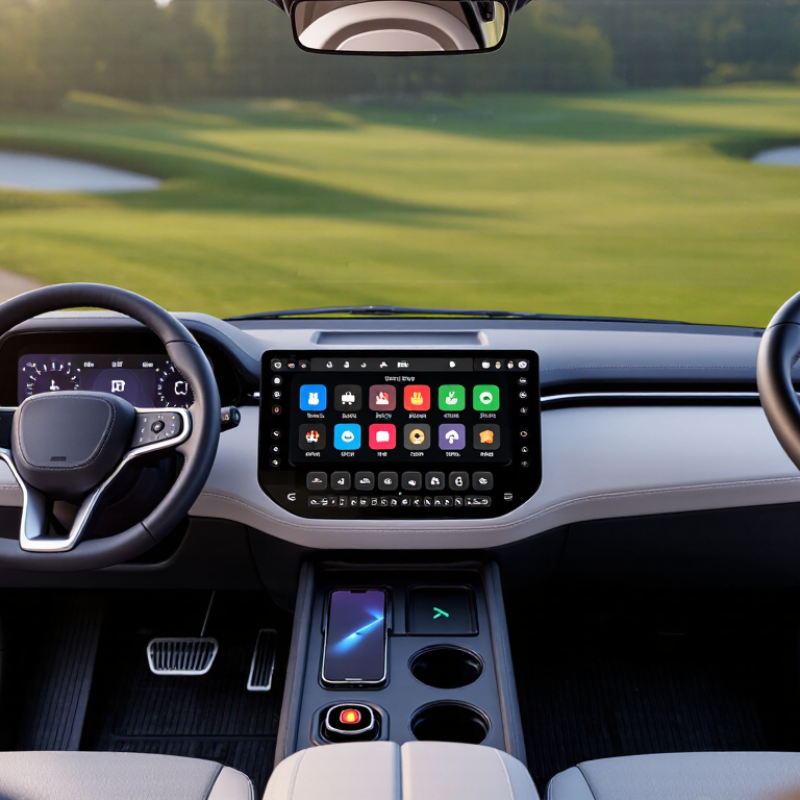
Top 10 Golf Cart Command Center Features Buyers Should Know?

What a Golf Cart Command Center Is and How It Works

A golf cart command center is the driver’s control and information area, usually built around a dashboard display and nearby switches. It brings key functions into reach instead of scattering them across the cart. Depending on the setup, it may show battery status, speed, and selected drive mode, while controlling lights, a horn, or other accessories. It is the hub. The exact features vary by cart.

When you press a button or turn a switch, an input signal travels through the cart’s wiring to a controller or connected component. The display then shows available information, such as an estimated battery level. That reading is useful, but it may change with load, terrain, and battery condition. A steep hill can make the number drop faster than expected. Command centers differ, so a familiar layout does not guarantee identical functions.

Tips: Check the cart’s manual to learn what each icon and control does. Test unfamiliar controls while parked, and note whether the display uses a percentage, bars, or voltage. Keep the screen clean; dust and bright sunlight can make small labels hard to read. Small details matter. If a reading seems inconsistent, compare it over time rather than relying on one glance.

Display, Navigation, and Connectivity Features

A useful golf cart command-center display should be readable at a glance, not merely large. High contrast, adjustable brightness, and clear icons help in bright afternoon sun. Glare matters. Check whether buttons remain easy to use with a light touch, especially when the cart is moving over uneven ground. A cluttered screen can distract more than it helps.

Navigation is most valuable when it shows clear paths, turns, and nearby course points without crowding the display. Some systems may depend on a steady phone connection, so ask whether maps remain available when reception drops. A route can look precise on screen but still miss a temporary path change. Keep it simple. Test the interface from the driver’s seat, where small text may be harder to read.

Connectivity features can include Bluetooth audio, call alerts, and phone charging status. Useful, but not every alert deserves attention during a round. A command center should let drivers silence notifications quickly and adjust volume without digging through menus. Check where charging ports sit; a cable across the console can become annoying. More features may sound better in a brochure, yet dependable controls often matter more than a long feature list. I would still compare screen visibility and connection stability in daylight before deciding.

Vehicle Controls, Safety Alerts, and Monitoring Tools

A golf cart command center should make routine driving clearer, not busier. Buyers should check for an easy-to-read speed display, direction selector, lighting controls, and horn access. These core controls matter when the cart carries passengers or moves through crowded paths. Buttons should remain usable with one hand. Not flashy, just practical.

Safety tools deserve equal attention. Look for overspeed warnings, parking-brake reminders, low-battery alerts, and fault messages that explain what needs checking. A clear alert should identify the issue without startling the driver. Some systems also show battery temperature or motor status; those readings can help spot unusual changes early. Still, alerts cannot replace a walk-around inspection. A screen may miss a loose fitting.

Monitoring features can include battery percentage, estimated remaining range, charging status, and trip data. Range estimates are useful, but terrain, load, and weather can change them noticeably. Buyers should test screen visibility in direct sun and at dusk, then confirm important controls work without menu hunting. The best interface is not always the one with the most data. Keep it simple.

Power, Weather Protection, and Installation Compatibility

A golf cart command center is useful only when its power, weather protection, and mounting match the cart. Check the service manual before tapping the electrical system; accessory voltage and available current vary by model. A display, phone charger, and navigation unit can overload a small accessory circuit or drain the battery when parked. Have the circuit and fuse capacity checked, and leave enough cable slack for steering movement. A tidy installation can still be wrong.

Weather sealing deserves equal attention. NOAA recorded 28 U.S. weather and climate disasters causing at least $1 billion in losses each during 2023. That figure is national, not a golf-cart failure rate. Still, rain, dust, and wet hands are ordinary outdoor realities.

IEC 60529 classifies protection against dust and water ingress; check the rating for the full assembly, including connectors and cable entries, not just the screen. Then test the unit after installation. Small detail, often missed.

Confirm the mount clears the steering wheel, windshield, and storage lids, and that the display stays readable from the driver’s seat. Cart dashboards differ, so measure before drilling and verify compatibility with the exact model year. A bracket that fits on paper may block a cup holder in practice.

How to Compare Command Centers Before Buying

A golf cart command center should make everyday tasks easier, not just add a crowded dashboard. Compare screen size and button placement from the driver’s seat, with hands on the wheel. Can you read the display in bright sun? Are essential controls easy to reach without leaning forward? Small details matter. Check whether the layout supports the accessories you actually plan to use, such as lighting, a charger, or a phone mount.

Look beyond appearance. Ask how the unit handles rain, dust, vibration, and routine cleaning, and whether its wiring is clearly documented. Confirm that it matches your cart’s electrical system before buying; a neat-looking panel is no help if installation requires guesswork. Compare power use, available connections, replacement parts, and how easily a technician can inspect the wiring. If possible, sit in a similar cart and try the controls. Product photos rarely reveal glare or awkward reach. It is easy to overvalue a long feature list, though I would not treat every extra switch as useful. A simpler center may be easier to understand and maintain. Check the details that affect your daily route, not just the ones that look impressive online.

FAQS

What is a golf cart command center?

It is the driver’s control area, usually built around a display and nearby switches. It keeps key functions within reach.

What information might the display show?

It may show speed, battery status, or the selected drive mode. Features vary by cart.

Is the displayed battery level exact?

Not always. Hills, passenger load, and battery condition can change the reading. Watch the trend, not one glance.

How do buttons and switches control cart functions?

An input signal travels through the wiring to a controller or connected component. The display may then show related information.

How can I learn what unfamiliar controls do?

Check the cart’s manual, then test controls while parked. Small details matter.

What makes a display easy to read?

Clear icons, strong contrast, and adjustable brightness help in afternoon sun. Dust and glare can still hide small labels.

What should I check before relying on navigation?

Test the map from the driver’s seat and ask whether it works without phone reception. Temporary path changes may not appear.

Which connectivity features can a command center include?

Some offer Bluetooth audio, call alerts, or phone charging status. Silence alerts quickly, and check that charging cables stay clear of the console.

Are more features always better?

Not necessarily. Reliable controls may matter more than a long feature list. I might still compare screen visibility in daylight before deciding.

Conclusion

A Golf Cart Command Center brings key information and controls into one convenient interface, helping drivers manage everyday trips with greater awareness and ease. Depending on the system, its display may show speed, battery status, trip information, and maps, while navigation and wireless connectivity can make it easier to plan routes or connect compatible devices. Clear menus and readable screens are especially useful when conditions change or drivers need information at a glance.

Before buying, consider how the command center handles vehicle controls, safety alerts, and ongoing monitoring, as well as whether its power requirements suit the cart. Check for weather protection appropriate to where the cart is used, and confirm that the unit fits the vehicle’s layout and installation requirements. Comparing screen visibility, available functions, ease of use, compatibility, and installation complexity can help buyers choose a practical system without paying for features they do not need.

Charlotte

Charlotte

Charlotte is a professional marketing specialist with a strong understanding of the company’s products, services, and customer needs. Through a combination of market insight, strategic thinking, and clear communication, she helps translate complex product features into practical value for......